CarrierTrail runs a remote Model Context Protocol server. Connect it once and your assistant can search FMCSA census records, read a carrier's authority, insurance filings and roadside safety summary, and see recent changes. Every answer links back to the carrier on CarrierTrail and shows the date of the data.
https://carriertrail.com/mcp/v1Connect
Claude (web, desktop and mobile)
Open Customize → Connectors, choose Add → Add custom connector. Name it CarrierTrail, paste the address below into MCP server URL and choose Continue. Keep No sign-in, choose Add, then Connect.
https://carriertrail.com/mcp/v1ChatGPT
Open Settings → Apps & Connectors → Advanced settings and turn on Developer mode. Then create a connector named CarrierTrail with the address below and no authentication.
https://carriertrail.com/mcp/v1Claude Code
Run this in a terminal:
claude mcp add --transport http carriertrail https://carriertrail.com/mcp/v1Cursor
Add it under Settings → MCP, or in ~/.cursor/mcp.json:
{
  "mcpServers": {
    "carriertrail": { "url": "https://carriertrail.com/mcp/v1" }
  }
}
VS Code
Run MCP: Add Server, choose HTTP and enter the address, or add it to .vscode/mcp.json:
{
  "servers": {
    "carriertrail": { "type": "http", "url": "https://carriertrail.com/mcp/v1" }
  }
}
Other clients
Add a remote MCP server using streamable HTTP with this address. No sign-in is needed.
https://carriertrail.com/mcp/v1Tools
search_carriers
Find carriers, brokers and freight forwarders by company name, optionally in one state. Returns up to 10 matches with USDOT number, city, state, USDOT status and power units.
get_carrier
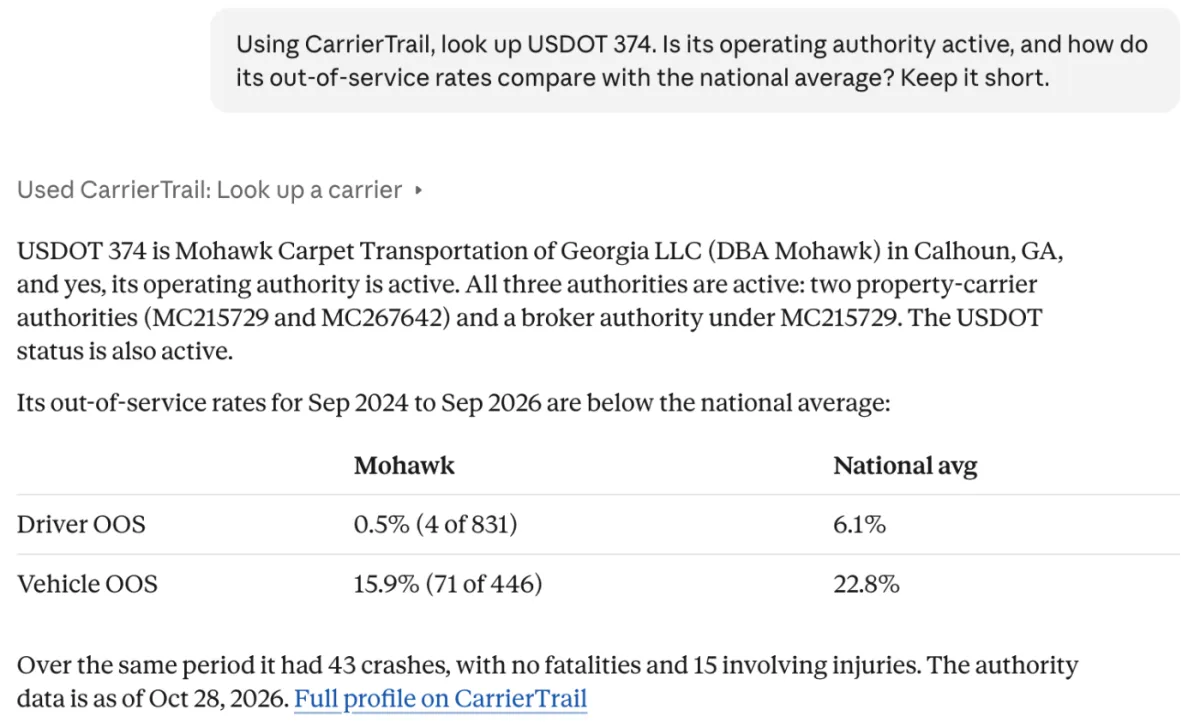
The record for one USDOT, MC, FF or MX number: legal and DBA name, city, state and ZIP, USDOT status, operation type, MCS-150 date and mileage, power units and drivers, safety rating, operating authority and its status, required and filed insurance and bond, current insurance filings, and the 24-month roadside inspection and crash summary with out-of-service rates.
get_recent_changes
Changes to one carrier's public census fields seen in the last 90 days, such as a new name, status, fleet size, MCS-150 date or docket.
Things to ask
- Look up this USDOT number and tell me if its operating authority is active.
- Find companies in Illinois with "Logistics" in the name.
- Has this MC number changed its name or fleet size recently?
- Compare the out-of-service rates of these three carriers.
Limits
The free lookup allows 20 lookups a day without an account, counted per network address, or per conversation when your assistant connects from its own servers. Searches and lookups both count. The allowance resets at midnight UTC. To watch carriers and get notified when they change, see the CarrierTrail plans.
What the data covers
Answers come from public FMCSA data: the Company Census File, Motus authority and insurance filings, and the SMS inspection and crash files. They show company details only: no officer names, home or mailing addresses, phone numbers or email addresses. Legal names are shown as filed with FMCSA. Each answer carries the date of the data it comes from. Data can lag official records by a day or more. It is not a safety rating, endorsement or verification by CarrierTrail. See data and methodology and privacy.
Bulk and business use
The free server is for individual lookups. Copying records in bulk, or using the data in a product or service, is not allowed on the free tier. Contact us for business use.